tintforge
A downloadable tool for Windows and Android
tintforge
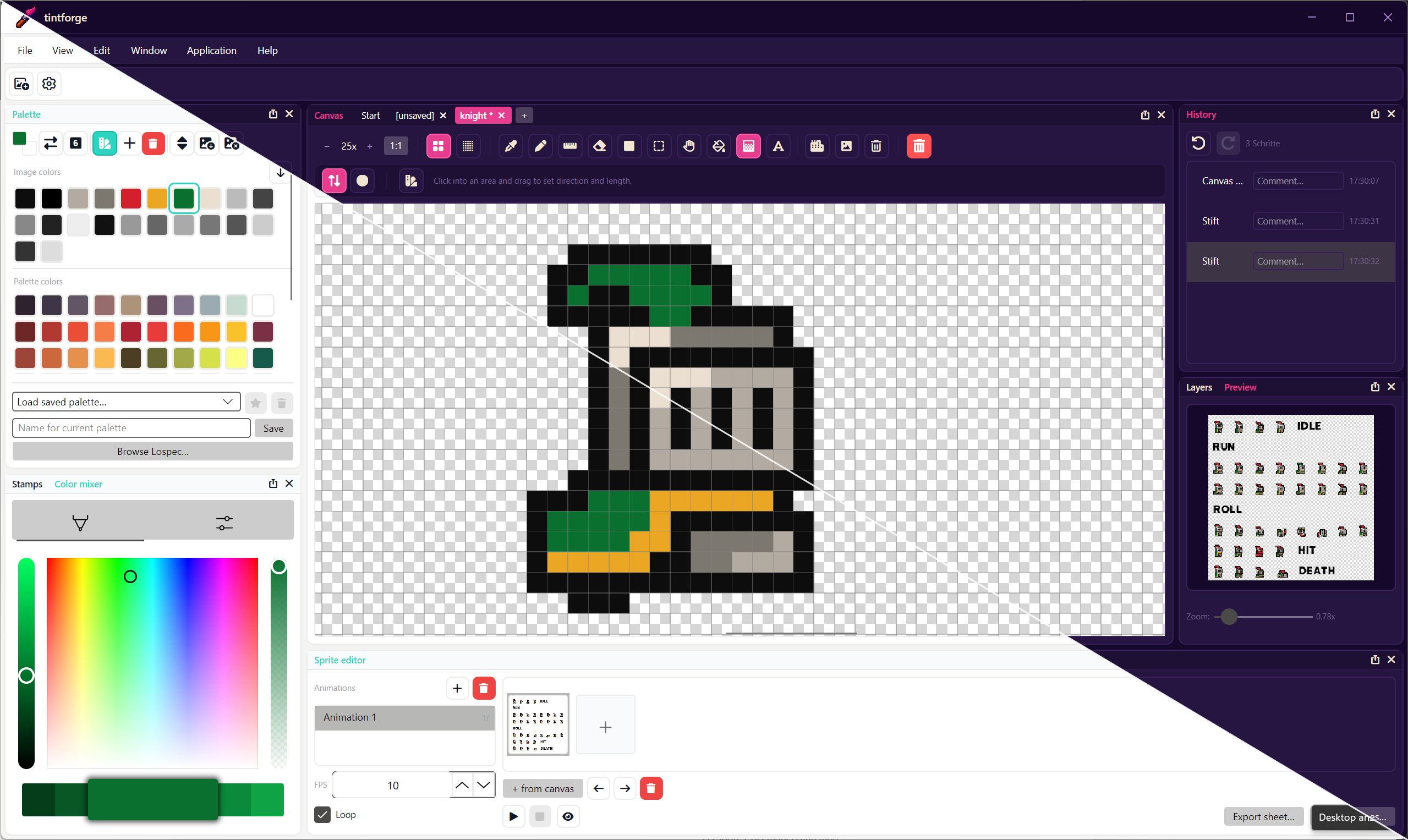
A modern pixel-art studio for tile artists, sprite animators, indie devs, and anyone who loves the click-by-click craft of drawing on a grid. Built from scratch as a clean, focused tool — no bloat, no subscription, no telemetry.
The drawing kit
- Pen, eraser, line, fill — pixel-accurate Bresenham everything, with a hover-indicator so you always see exactly which cell will get hit
- Shape tool — rectangle, circle, ellipse, half-circle, quarter-circle and circle segments with arbitrary start/end angles. All with optional fill, configurable outline thickness, and a "draw from center" modifier
- Polygon tool — 3 to 32 sides, free rotation, filled or outlined
- Gradient tool — linear or radial, multi-stop, with optional ordered dithering for that authentic retro look
- Selection — rectangular, lasso, magic wand. Snap-rotate 90° or free-rotate via drag handle. Modifier-aware: Ctrl/Shift to add, Alt to subtract
- Text tool — type directly on the canvas and watch the live, pixel-accurate preview update with every keystroke. Browse fonts with in-place pixel previews so you can judge how each typeface actually looks at 8 px before committing
- Tile workflow — define tiles from any grid cell, stamp them anywhere, erase mappings without disturbing the underlying pixels
🎨 Color & palette workflow
- Full HSV color mixer with RGB sliders, hex entry, and a swap-foreground/background indicator straight out of the Photoshop playbook
- Live palette editing — double-click a color, change it, and every pixel you've painted with it updates everywhere instantly (stable color-id tracking under the hood)
- Manual palette ordering by drag-and-drop, line-break markers for grouping, and eight sort algorithms (HSL/HSV hue, lightness, value, saturation, Y'UV luminance, Zucconi step-sort, name)
- Image colors panel — load a different palette and the original image colors stay accessible and editable; merge them back in with one click
- "Reduce or Replace Colors" dialog with a similarity slider for one-shot palette compression and drag-and-drop manual remapping — the original canvas stays untouched until you hit Apply
- One-click Lospec palette import by slug or URL, full Lospec catalogue browser built in
- Mark any saved palette as your default — it loads with every new canvas
📑 Multi-document, multi-everything
- Tabs — multiple canvases open at once, each with its own palette, layers, sprite animations, tile set, and undo history
- Layers — unlimited per document, with opacity sliders, visibility toggles, drag reorder
- Reference images — drag any image in and dock it as a floating reference window with zoom and pan, saved with the project
- Stamp gallery — save any selection as a named pixel-art preset, drag from the gallery onto any canvas to paste. Rename, reorder, delete from a dockable panel
- Sprite editor — animation frames per document, FPS control, looping playback, onion-skinning, export as sprite sheet or individual frames
- History — every action is a step you can jump back to, with timestamps and your own comments
⚙️ Built for the way you work
- Fully dockable UI — drag any panel to any edge, float it, tab it. Your layout is saved automatically
- Light and dark themes — the dark theme is tintforge's own magenta-on-deep-purple palette, built for long sessions
- Custom hotkeys for every action, configurable in the settings dialog with a one-click "press a key" capture
- Multi-language — German and English ship with the app, and the translation editor inside the settings lets you create your own language file
- Native
.pxa.xmlproject format — full state in a single human-readable XML file: layers, palette, color-ids, tiles, references, history. Versioning-friendly, future-proof - Import / export — PNG, JPEG, BMP. Imports prompt you whether to open as a new tab, paste as a floating patch, drop in as a new layer, or attach as a reference
🛠️ Work in progress — and that's the point
tintforge is being actively developed and improved with every release. New tools, new workflows, polish, fixes — they ship continuously. What's there today already works; what's not there yet is on the way.
💬 Got an idea? I'm listening
Post your suggestions, bug reports, and feature requests in the Community tab here on itch.io. Every idea is read and considered.
Heads-up: requests from supporters who paid more than the free price get priority on the roadmap. If a feature matters enough for you to chip in, it matters enough for me to build it first.
🚀 Try it
Hit Download Now — name your own price (free is fine, supporters welcome) — and start drawing. The Windows installer drops everything in %LOCALAPPDATA%\tintforge, registers .pxa.xml as a double-click-to-open file type, and uninstalls cleanly when you want it gone.
Have fun making pixels. ✨
Download
Click download now to get access to the following files:
Development log